
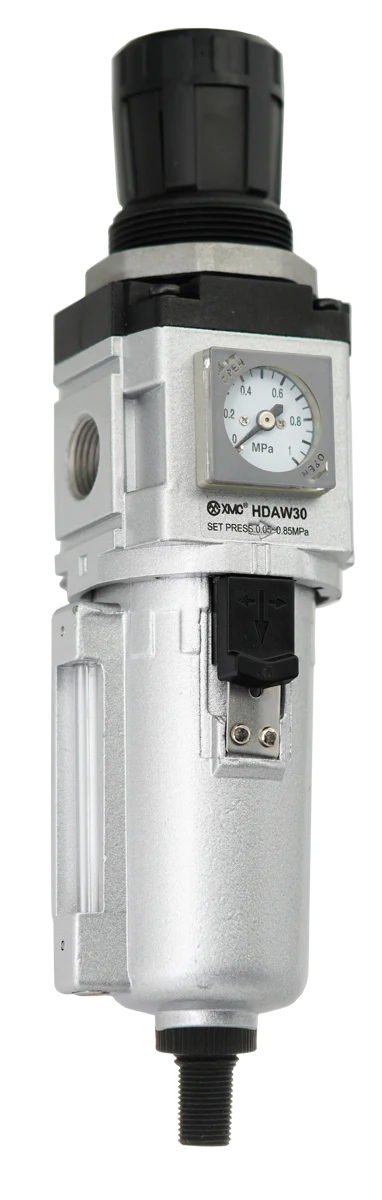
For an HDA configuration with an EP embedded pressure switch, specify the receiving controller’s required output types and channels before approving the order. The HDAW ordering page refers its EP signal-output field to the catalogue’s page 47 table. That table distinguishes NPN, PNP, analogue and RS485 combinations. Use it to identify a candidate output code, then obtain the exact HDA model, electrical ratings, connection drawing and operating instructions. An EP label or the example code 003 alone does not establish compatibility with a PLC.
Start with the HDAW ordering reference
On printed page 58, the HDAW ordering diagram identifies EP as an embedded pressure switch. Its final signal-output field gives 003 as an example and explicitly refers the reader to page 47. Page 47 is headed HACE, so the relevant evidence for this HDAW review is the referenced output table, not an assumption that every HACE feature applies to HDA. [1, 2] In particular, the response-speed and communication-capacity claims elsewhere on that page are not used here as HDA specifications. Ask for the current data sheet for the complete proposed HDA configuration.
Keep display choice and controller output requirements separate
The HDAW page distinguishes a square gauge, a round gauge and the EP embedded switch. [1] A requirement to read pressure locally is different from a requirement to send signals to a controller. Record whether the project needs switching states, a pressure value for trending, serial communication, or a combination. Then identify the actual controller input modules and the channels assigned to the task. Do not select an electrical output from the pneumatic port size or assume that every device with a display supplies the same signals.
Read the output table as a set of candidate combinations
The following selected entries retain the page 47 output descriptions. [2] They describe the listed combinations, not a wiring diagram or a complete HDA ordering code. The numbers in 2NPN and 2PNP describe the listed output counts; a mixed 1NPN + 1PNP entry is not a statement that both outputs can be freely configured as either type. Confirm the supplied configuration and applicability with XMC before assigning controller channels.
| Output code | Catalogue output description | Receiving-interface question |
|---|---|---|
| 001 | 2 NPN | Does the selected controller input arrangement support both specified NPN outputs? |
| 002 | 2 PNP | Does the selected controller input arrangement support both specified PNP outputs? |
| 003 | 1 NPN + 1 PNP | Are the two different output types suitable for the assigned channels? |
| 010 / 011 | 2 NPN + one analogue output: 1–5 V / 4–20 mA respectively | Which analogue signal does the receiving module require? |
| 020 / 021 | 2 PNP + one analogue output: 1–5 V / 4–20 mA respectively | Confirm the analogue channel type as well as the two switching channels. |
| 030 / 031 | 1 NPN + RS485 / 1 PNP + RS485 respectively | Obtain the exact communication and controller-interface documentation. |
A hypothetical two-PNP plus 4–20 mA purchasing request
Assume a machine builder requires two PNP switching signals and a 4–20 mA pressure signal for trending. This is an illustrative procurement requirement, not a tested XMC application. In the referenced table, 021 is the candidate output code that matches that description. Code 002 lists the two PNP outputs but no analogue output; 020 lists the same switching count with 1–5 V instead; 003 lists one NPN and one PNP without the requested analogue output. [2] The purchasing task is to resolve those differences before a complete model is approved, not to append 021 to a guessed code.
| Requirement in the hypothetical brief | 021 candidate | Why a different entry needs review |
|---|---|---|
| Two PNP switching signals | The table lists 2 PNP. | 003 lists one NPN and one PNP, not two PNP. |
| One 4–20 mA pressure signal | The table lists one 4–20 mA analogue output. | 002 has no analogue output listed; 020 lists 1–5 V. |
| Ready to connect to the actual PLC | Not established by the output table. | Electrical ratings, pin assignment, scaling and receiving-module requirements still need confirmation. |
Close the electrical interface before releasing the order
Request the selected switch’s supply requirements, electrical output ratings and complete connection drawing, and compare them with the actual controller documentation. Obtain the connector or cable identification and pin assignment from XMC; this catalogue review does not supply wire colours or terminal numbers. For an analogue channel, agree the pressure range represented by the signal and the controller scaling. Do not substitute the HDAW pneumatic regulating range for the EP analogue measurement range or its signal endpoints. For an RS485 candidate, obtain the applicable protocol details, communication settings and data/register description. The word RS485 in the output table is not that complete integration document. Keep any unsupported interface field unresolved.
| Record | Supplier evidence | Controller/project evidence |
|---|---|---|
| Device identity | Confirmed complete HDA model, switch identity, output code and data-sheet revision. | Machine drawing revision and assigned I/O list. |
| Power and connections | Supply specification, output ratings, connector/cable and pin-assignment drawing. | Actual supply and receiving-module requirements; approved connection drawing. |
| Switching task | Available settings and output-state behaviour for the supplied version. | Required channel type, intended switching states and agreed test conditions. |
| Analogue task, if selected | Signal type, pressure-to-signal relationship and applicable limits. | Input-channel type, engineering-unit scaling and acceptance method. |
| Serial task, if selected | Protocol/settings and data/register documentation for the supplied version. | Controller interface and agreed communication test. |
| Handover | Applicable instructions and record of unresolved items. | Responsible reviewer, acceptance result and final drawing revision. |
Agree the observation and acceptance task
State where the pressure is being monitored and which machine condition each signal is intended to describe. An indicated pressure at the selected measurement point does not by itself prove adequate pressure at every downstream user. Agree how the supplied switch settings and controller indications will be checked under the intended operating conditions, including the requested behaviour when pressure or electrical supply changes. Obtain the applicable instructions before commissioning. This is a purchasing and acceptance record, not a wiring procedure, validated control sequence or safety-interlock design.
Have XMC confirm the complete model rather than composing it
Keep the pneumatic requirements alongside the electrical record: filter/regulator function, body and port, actual thread, operating pressure and demand, drain, bowl and mounting. The page 58 printed third example has different letters in its Chinese and English model text, so obtain a supplier-confirmed complete designation instead of treating this article as a code generator. [1] Send the required output description in words as well as the candidate field. If the controls engineer requests a change from 003 to another output combination, keep the resulting model, drawing and quotation revisions together.
Catalogue evidence and scope
This guide reads an explicit HDAW ordering-page cross-reference and turns it into an electrical purchasing handover. It does not establish a standalone switch product route, stock availability, electrical compatibility, switching accuracy, response time or a safety rating. Confirm the selected HDA configuration against its current supplier documents. The tables above preserve the distinction between a catalogue output description and a completed integration review.
Questions buyers ask.
Does the EP option always mean two PNP outputs?
No. The referenced table distinguishes combinations: 002 lists two PNP outputs, while 003 lists one NPN and one PNP. Specify the required output combination and confirm its applicability to the complete HDA model.
Which listed code includes two PNP outputs and 4–20 mA?
The page 47 table lists that combination under 021. Treat it as a candidate output field, not a complete order or proof of PLC compatibility. Obtain the selected model’s data sheet, connection drawing and scaling information.
Can I use the 1–5 V and 4–20 mA options interchangeably?
They are different output descriptions. Specify the signal expected by the actual receiving module and obtain the matching supplier-confirmed configuration and connection information.
Is the RS485 entry enough to complete the controller program?
No. Obtain the exact supported communication settings, protocol and data/register documentation for the supplied version, then agree the integration test with the controls engineer.
Does an embedded pressure switch certify a safe pressure interlock?
No safety function or rating is established by these ordering pages. A machine safety function requires its own applicable design and validation evidence; this article only organizes a component purchasing review.
Technical references
- [1] XMC Huayi Pneumatic Catalogue, edition 21 June 2025, printed page 58. The HDAW ordering diagram identifies EP and refers its signal-output field, with example 003, to page 47. Original customer PDF and public HDA extract visually checked 30 October 2026. Chinese/English example-letter discrepancy remains a supplier-confirmation item.
- [2] XMC Huayi Pneumatic Catalogue, edition 21 June 2025, printed page 47 (PDF page 31 in the full public catalogue). Output table read through the explicit HDAW cross-reference. Original customer spread and public compressed catalogue page visually checked 30 October 2026. HACE feature claims elsewhere on that page are not transferred to HDA; the worksheets are editorial purchasing aids.
Put the guide to work.
Choose the relevant XMC series, download its product PDF and include the application details with your inquiry.